ETL
This Compressa platform module allows extracting data from unstructured documents and chunking them taking into account document structure. This is important for efficient search / RAG or use in LLM.
The model runs as a standalone service outside the platform and is a fork of the Unstructured-API project, adapted to run on CUDA. The GPU version works approximately 1.5 times faster than the CPU version, but requires 1-2 GB of additional video memory.
By default, the platform's compose file includes only the CPU version, however, by editing the docker-compose.yaml and .env files, you can run the service on GPU.
The service will be connected to nginx bypassing Compressa-Dispatcher.
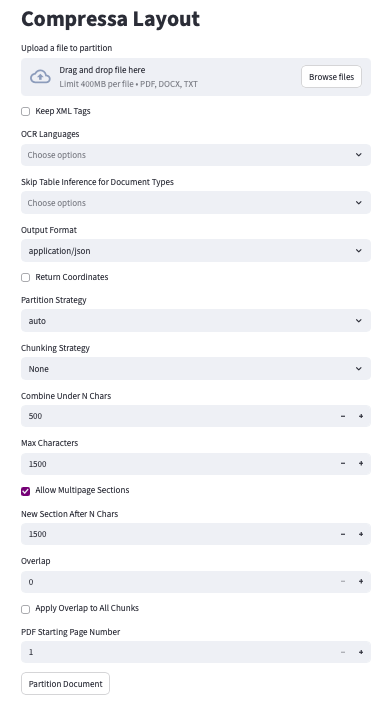
UI will be available at http://your_address:8080/v1/ui-layout
# .env
...
LAYOUT_RESOURCES_PATH=/data/shared/CompressaAI/<DEPLOY>
NETWORK=test_network
PROJECT=dev
PORT=8100
LAYOUT_GPU_IDS=2
...
...
  unstructured-api:
    environment:
      - LAYOUT_RESOURCES_PATH=${LAYOUT_RESOURCES_PATH:-./resources} # somewhere in RESOURCES_PATH
      - PROJECT=${PROJECT:-compressa}
      - PIPELINE_PACKAGE=${PIPELINE_PACKAGE:-general}
    container_name: ${PROJECT:-compressa}-unstructured-api
    volumes:
      - ${LAYOUT_RESOURCES_PATH:-./resources}:/home/notebook-user/.cache
    ports:
      - ${PORT:-8100}:8000
    deploy:
      resources:
        reservations:
          devices:
          - capabilities:
            - gpu
            device_ids:
            - ${LAYOUT_GPU_IDS:-0}
            driver: nvidia
    image: compressa/compressa-layout-gpu:0.3.9
    restart: always
    shm_size: 32g
    networks:
      - ${NETWORK:-common_network}
...
Составим запрос на примере документа:
- Python (requests)
- cURL
# pip install requests, если у вас нет этой библиотеки
import requests
import os

# Download a PDF file for example:
pdf_url = "https://www.w3.org/WAI/ER/tests/xhtml/testfiles/resources/pdf/dummy.pdf"
pdf_response = requests.get(pdf_url)

# Save the file
with open("dummy.pdf", "wb") as file:
    file.write(pdf_response.content)

# Send the file for chunking
compressa_url = "http://your_address:8080/v1/layout"
headers = {
    "Authorization": "Your_API_key_Compressa",
    "accept": "application/json",
}

# Specify the path to our file
files = {"files": open("dummy.pdf", "rb")}

# Set chunking parameters
data = {
    "output_format": "application/json",
    "coordinates": "false",
    "strategy": "fast",
    "languages": ["rus", "eng"]
}

response = requests.post(
    compressa_url,
    headers=headers,
    files=files,
    data=data
)

# Output document chunks in JSON format
print(response.json())
curl -X POST "http://your_address:8080/v1/layout" \
  -H "Authorization: Bearer Your_API_key_Compressa" \
  -H "accept: application/json" \
  -F "files=@path/to/file.pdf" \
  -F "xml_keep_tags=false" \
  -F "output_format=application/json" \
  -F "coordinates=false" \
  -F "strategy=auto" \
  -F "languages[]=rus" \
  -F "languages[]=eng"
Below we'll discuss some settings in more detail, the full API schema is available here.
Document Processing Strategy (strategy)
fast: the "rule-based" strategy uses traditional NLP-based extraction techniques to quickly extract all text elements. The "fast" strategy is not recommended for files containing complex layouts, images, and other visual style elements.
hi_res: the "model-based" strategy determines the document layout. The advantage of the "hi_res" strategy is that it uses the document layout to obtain additional information about its elements. We recommend using this strategy if your use case requires high accuracy in classifying document elements.
auto: the "auto" strategy automatically selects the document splitting method depending on its characteristics and other passed parameters.
Chunking Parameters (text splitting)
max_characters (default = 500) — hard limit for the size of one block. No block will exceed the specified number of characters. If an element itself exceeds this size, it will be split into two or more blocks using text splitting.
new_after_n_chars (default = max_characters) — "soft" limit for block size. A block that has already reached this number of characters will not be expanded, even if the next element would fit without exceeding the hard limit. This parameter can be used together with max_characters to set a "preferred" size, for example: "I prefer blocks around 1000 characters, but it's better to take a block of 1500 (max_characters) than to resort to text splitting". This can be set as (..., max_characters=1500, new_after_n_chars=1000).
overlap (default = 0) — when using text splitting to divide a too large block, the specified number of characters from the end of the previous block is included as a prefix for the next one. This helps mitigate the effect of breaking a semantic unit represented by a large element.
overlap_all (default = False) — also applies overlap between "regular" blocks, not just when splitting large elements. Since regular blocks are formed from whole elements, each of which has a clear semantic boundary, this option can add noise to normal blocks. You need to consider the specifics of your use case to decide if this parameter is suitable for you.
ETL UI Example